
5.1Applying to a Job Post5.2Answering the Q&A5.3If You Edit the Job Post After Tutors Apply5.4If a Tutor Withdraws Before Being Matched
If You Edit the Job Post After Tutors Apply
Changing something like the schedule or the Q&A after Tutors have already applied doesn’t leave them in the dark.
What the Tutor Sees
About two hours after you save the change, every Tutor who applied gets an email letting them know the opportunity they applied for has changed, with a button that takes them straight back to it. They have to update their application and accept the changes to still be considered.

What’s on This Screen
- Message, naming the opportunity and school, and explaining that the Tutor must update their application and accept the changes to still be considered.
- Review Opportunity Now, a button that takes the Tutor straight back to the opportunity.
- Contact Tutor Support link, for anything the Tutor needs help with.
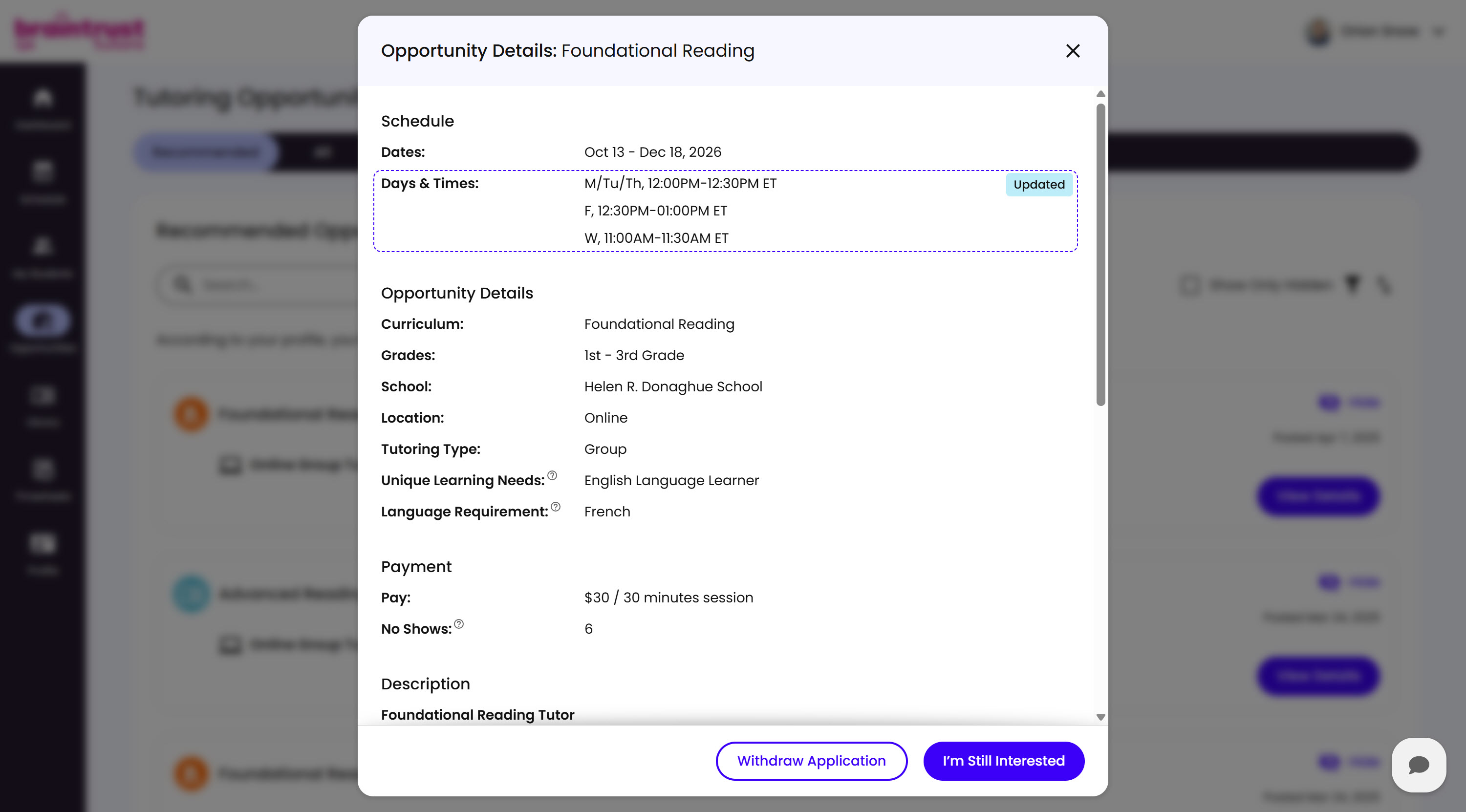
When they open it, anything that changed, like Days & Time, Availability, or the Q&A questions, is called out for them with an “Updated” label so they know exactly what’s different.
What’s on This Screen
- Updated field, outlined and labeled Updated, right where the change happened, here Days & Times.
- Withdraw Application, a button for backing out if the change no longer works for them.
- I’m Still Interested, a button for confirming they’re still in, answering anything new the change requires.
From there, they either confirm they’re still interested and answer anything new, or withdraw if the change no longer works for them.