
Once a school is up and running, most of your work is keeping things moving and stepping in when something needs attention:
- If a school needs an additional or replacement tutor, you file the request. Recruitment handles it from there, so this isn’t a platform action on your end.
- If a school’s schedule, groups, or student roster need to change, you request it too. Ops Support makes the actual change in the platform.
- Reviewing assessment scores, lesson recommendations, and session progress when something needs a closer look, starting below.
- Escalating platform questions or issues, like a bug, to the
#learning-platform-supportSlack channel. See Escalating Platform Issues. - Supporting district and school staff: showing them where things are, what they have access to, and making sure they have what they need on the school’s end.
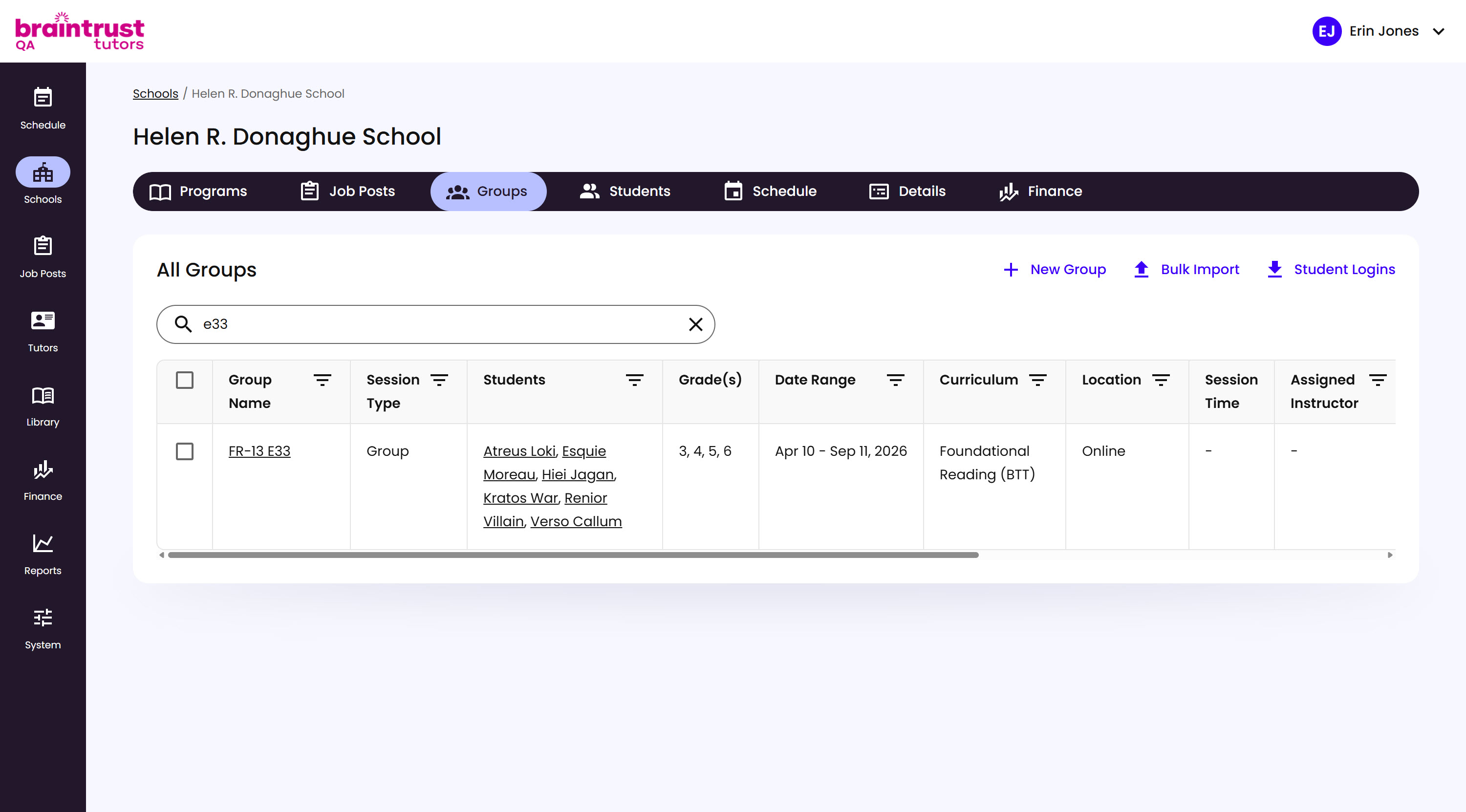
Every School has its own Groups tab, listing every Group running at that School.
What’s on This Screen
- Search bar, for finding a specific Group.
- New Group, Bulk Import, and Student Logins, at the top right.
- Group Name, linking to the Group’s own page.
- Session Type, Group or 1:1.
- Students, each linking to their own page.
- Grade(s), Date Range, Curriculum, Location, Session Time, and Assigned Instructor, at a glance for every Group.
Click a Group’s name to open its own page, where assessment scores, lesson recommendations, and session progress all live.